The phone is for catching things fast. The risk of catching things fast is that they land in the wrong place: a grocery reminder in your Work project, a client follow-up in your personal one. We have been working on that in the iPhone app, and here is where it stands.
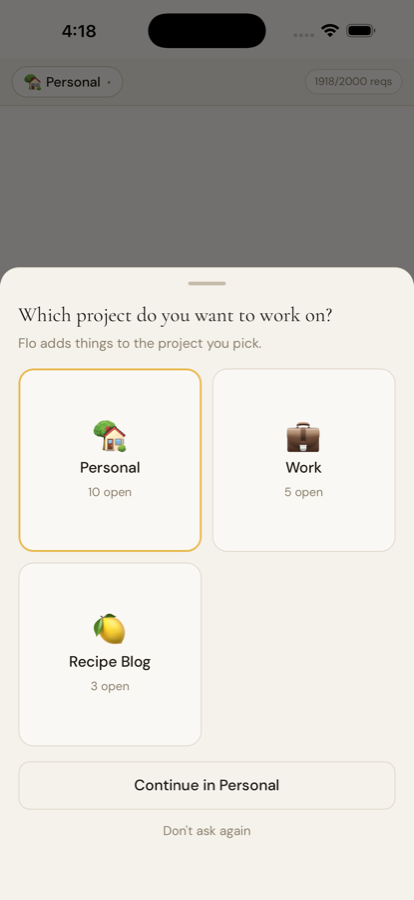
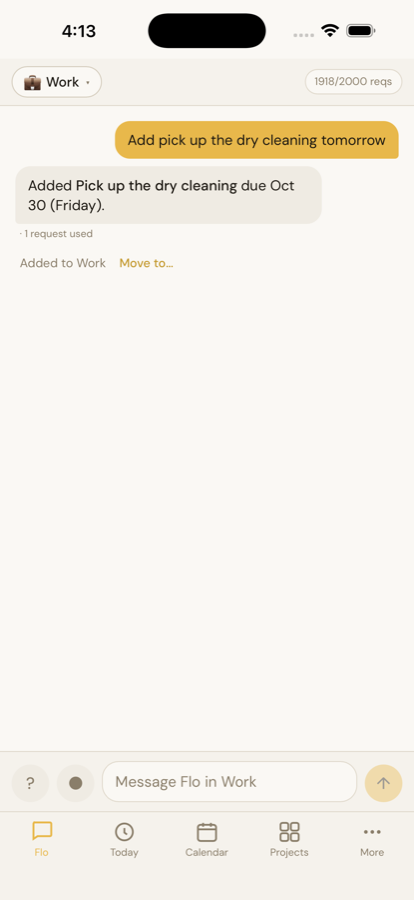
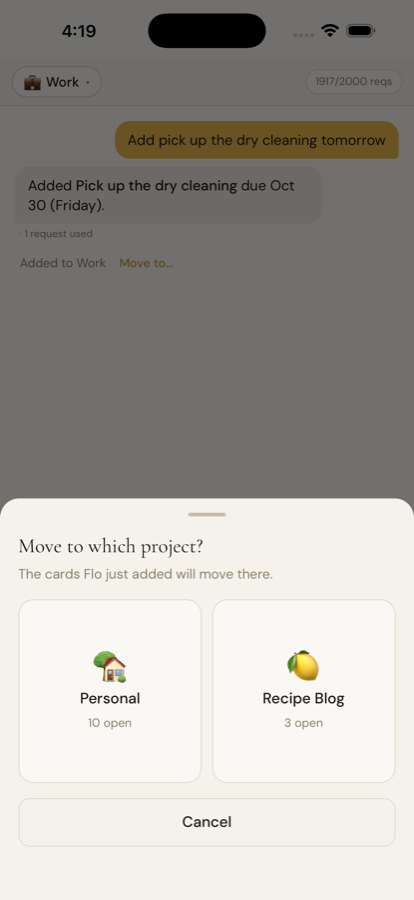
It asks, once, when you open it
If you have more than one project, opening the app shows a simple grid: one square per project, with how much is open in each. Tap one and Flo works in that project. Come back after a quick trip to another app and it picks up exactly where you were, no question asked.
If you always work in the same place, you can tell it. In Settings you can choose to be asked every time, to open where you left off, or to always open one project of your choice.
Always clear where you are
The message box now says which project you are talking to, "Message Flo in Work", and each project keeps its own conversation. Switch projects and the chat switches with you.
Wrong project? One tap
Every time Flo adds something, it says where it went, "Added to Work", with a Move to option right beside it. Tap it, pick another project, and the card goes there. No digging through the project to drag it across.
What is next
The app is still in testing and we do not have a release date to share yet. We will keep sharing the pieces as they come together. If you use planFlo on the web, you will find the same project-by-project chats there today.